Substituting 4G Mobile Data for Fixed Line Broadband
Using 4G mobile data connection is viable for some users with modest bandwith requirements. In some locations this can even provide higher bandwidth than a fixed line, and possibly lower cost to boot. However there is a catch.
One major drawback of 4G mobile network in Australia is that all the operators employ Carrier-Grade NAT (CGNAT) and therefore there is no internet routable public IP address. This blocks inbound external connetions from the internet. For example users away from home cannot check the home security camera, or wanting to provide services such as hosting online multiplayer games or websites.
There are several techniques for getting around this limitation by employing two servers. First is a virtual private server (VPS) with a public IP acting as the front entry point for remote clients to connect to. And then a second server on the LAN tunnelling into the first server, and pass inbound traffic into the LAN. For applications not sensitive to latency a free tier Google Cloud virtual machine can often suffice.
Option 1 - VPN tunnels (WireGuard, OpenVPN, etc)
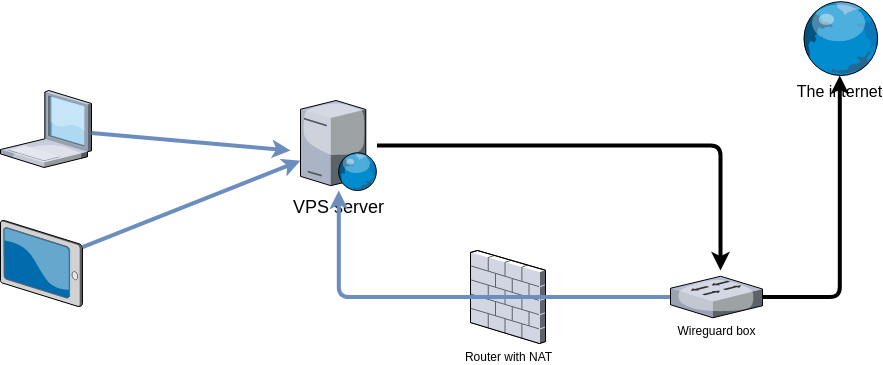
WireGuard VPN is my preferred tunnel solution as this is relatively easy to set up using public key authentication. Additionally the stateless connection makes the tunnel relatively quick to reestablish during patchy connectivity. Also it runs on UDP protocol so it should have lower overhead than other TCP-based solutions.
Help me make a “reverse VPN” box has a configuration example posted by sellibitze for this use case. I particularly like this configuration as it requires only one WireGuard interface on the VPS.
Let’s assign IP addresses first:
VPS WG config:
1 | [Interface] |
WG-box WG config:
1 | [Interface] |
Laptop WG config:
1 | [Interface] |
Now, you need to make sure traffic on the VPS is routed like you want it to. Bringing up WireGuard on this VPS like this would send all the traffic addressed to the internet to the WG-Box. So, if you were to apt-get install something on the VPS, it would try to download this package via the WG box. In my humble opinion, that’s undesirable. If you want to kind of “isolate” the Wireguard traffic from the “normal” traffic on the VPS, you could try something like this:
VPS WG config:
1 | [Interface] |
The # Routing part adds new default routes to the table 51800. It also instructs Linux to prefer these new default routes only if the source IP address is from the Wireguard subnet.
The additional firewall rules are just about making sure that any IP packet that comes in on wg0 can only get forwarded back to wg0.
On both VPS and the WG-box you would have to enable IP forwarding (sysctl//etc/sysctl.conf) and on the WG-box you also need masquerading. This could be added to the Wireguard config as well:
WG-box WG config:
1 | [Interface] |
(assuming eth0 is its internet-facing network interface).
Of course, all the [Interface] and [Peer] sections also need private / public keys. In addition, you should add the following to the [Peer] # VPS sections of all the other configs.
1 | Endpoint = ... |
Option 2 - SSH reverse tunnel
This approach forwards a port on the LAN onto a remote port on the VPS. This is handy for providing publicly accessible services.
Tunneling out of Carrier Grade Nat (CGNAT) with SSH and AWS has a good write-up to illustrate this implementation.
AutoSSH is a tool to monitor SSH connection and respawn a new tunnel automatically when the connection is dropped.
Note SSH tunnels are TCP-based so you could run a TCP-based protocol on top of it, such as OpenVPN. However it doesn’t seem to play nice with UDP-based protocol such as WireGuard.